As a Mercedes-Benz driver, you can now use Car Wash to purchase wash tickets for over XXX participating wash stations in Germany via the Mercedes-Benz App.
You can use Car Wash via the Mercedes-Benz App with all Mercedes-Benz passenger car models which support Digital Extras.
If you do not have a Mercedes me ID yet, you can easily register with your e-mail address. For further information click here.
This is how it works:
• If you have not installed the Mercedes-Benz App, download the app from the Apple App Store or the Google Play Store on your smartphone.
• Log in with your Mercedes me ID. If you do not have one, register here.
• Once you have logged in with your Mercedes me account, activate the Car Wash service as described in section 1 "Activate Service". Afterwards, Car Wash can be used to get your car washed.
Yes! The service Car Wash is free of charge.
When you purchase a car wash ticket with Car Wash, you only pay the amount for the car wash ticket, and are billed via the stored payment method. At the end of the payment process, you will be shown a payment summary.
You can currently use the Mercedes-Benz App on Apple and Android devices, which can easily be downloaded from the Apple App Store or Google Play Store. After activating the service in the service management of your Mercedes-Benz App, you can use Car Wash via the Mercedes-Benz App.
• Open the Mercedes-Benz App on your smartphone and switch into the menu on the upper left screen in the app.
• Select your vehicle.
• Select "Manage services".
• Select the "Comfort" category.
• Activate „Car Wash“
• Log in with your Mercedes me ID on the following website: Service Management.
• You will then be taken directly to the "Manage Digital Extras" section.
• Scroll until the "Comfort" category appears. Now activate “Car Wash“.
With Car Wash, you can purchase car wash tickets directly via the Mercedes-Benz App for over XXX participating wash stations in Germany. You can discover these wash stations in the app's navigation map.
Participating wash stations have upgraded their point of sales (POS) systems to enable contactless payments via the Mercedes-Benz App. Not all wash stations have such a POS system, and may still need to be technically enabled. Therefore, we are continually adding new wash stations to our network.
Yes, as this is the only way Car Wash can show the participating wash stations, or be used to pay for your purchased ticket.
Here's how it works with Car Wash:
To enable paying with Car Wash, the app digitally communicates via the internet with the POS system of the participating wash station. The Mercedes-Benz App communicates with the cash register on your behalf and pays the ticket.
Does the Mercedes-Benz app display any of the following?
• No internet connection. Without a connection to a mobile network or Wi-Fi, Car Wash cannot communicate with the wash station cash register. So, check your internet connection and try again.
• Logged in? Check to see if you are logged into the Mercedes-Benz App.
Yes! There are no extra costs for purchasing the car wash ticket via Car Wash.
You can redeem the car wash ticket only at the wash station which you have chosen for buying the ticket.
The validity of the car wash ticket is depending on each wash station. The validity date will be displayed in the Mercedes-Benz App after you have purchased a car wash ticket.
Start Car Wash in your Mercedes-Benz App and select the wash station location and the desired wash program. Follow the steps and, if necessary, authenticate the payment using 3D Secure to complete the purchase process.
You can purchase car wash tickets at any given time through the Mercedes-Benz App – even on Sundays or public holidays from your home.
You can redeem the car wash tickets during the opening hours of the respective wash station. You can find the opening hours in the Mercedes-Benz App.
Due to a new EU regulation called the European Payments Services Directive (PSD2 for short), an additional security step is required for online and mobile payments.
Two-factor authentication takes place with your bank or card provider with 3D Secure (3DS for short), which ensures that you are really the person confirming payment.
Your bank or card provider decides whether this is visible to you for each transaction, or runs seamlessly in the background. To do this, simply follow the instructions in the app. You may need to confirm your identity before paying with Car Wash. This is possible, for example, via Visa Secure or the Mastercard® Identity Check, and depends on your bank or card provider.
If the payment is cancelled and your identity is not confirmed, you cannot pay successfully with Car Wash.
Car Wash is constantly working to ensure that purchasing car wash tickets is a smooth and convenient process. In the rare case that something doesn't work correctly, we provide help in the Mercedes-Benz App, by simply switching to the menu and selecting "Help". In the next step, you can write a message to our support team under "Contact Support" or call directly.
Fuel & Pay is constantly working to ensure that paying for fuel is a smooth and convenient process. In the rare case that something doesn't work correctly, we provide help in the Mercedes-Benz App, by simply switching to the menu and selecting "Help". In the next step, you can write a message to our support team under "Contact Support" or call directly.
You can add your credit card to your Mercedes me account and conveniently use it for any purchase made with Car Wash.
If you want to delete or change your payment details, log in to the web with your Mercedes me ID. Switch to the "My profile" area via "My Mercedes me account" in the top right-hand corner. Under the item "Payment method" you can edit your payment information, add another credit card or delete it.
Car Wash is aiming to provide as many payment methods as possible for the future to make the service even more convenient for our customers. Specific methods depend on market feedback and may vary from country to country.
We are working with different partners to provide the Car Wash service to our customers. The content of the receipt may vary depending on the partner and market, but usually include:
• The receipt number
• Date of purchase
• The quantity, wash program and price
• The total amount incl. Value-added Tax (VAT)
• Seller of the car wash ticket.
You will receive a receipt shortly after the successful purchase via e-mail or inbox message. It is recommended to check your e-mail spam folder in the event that a receipt has not been received. In the event that a receipt cannot be found, or you have not received a receipt, please contact our support.
As a Mercedes-Benz driver, you can now use Fuel & Pay to pay contactless at nearly XXXX participating fuel stations in Germany via the Mercedes-Benz App, or directly from the vehicle.
You can use Fuel & Pay via the Mercedes-Benz App with all Mercedes-Benz passenger car models manufactured from 2018 onwards. Vehicles with the MBUX NTG6 navigation module also support Fuel & Pay via the vehicle infotainment system. Mercedes-Benz cars that have installed the NTG5 and NTG5.5 telematics generation can use Fuel & Pay via the Mercedes-Benz App. Do you drive a van? You can use Fuel & Pay in the V-Class, Sprinter, Vito, Citan and T-Class.
If you do not have a Mercedes me ID yet, you can easily register with your email address. For further information please click here.
This is how it works:
• If you have not installed the Mercedes-Benz App, download the app from Apple App Store or the Google Play Store on your smartphone.
• Log in with your Mercedes me ID. If you do not have one, register here.
• Once you have logged in with your Mercedes me account, activate the Fuel & Pay service. Afterwards, Fuel & Pay can be used to refuel your car.
• If you have not installed the Mercedes-Benz App yet, download the app from the Apple App Store or the Google Play Store on your smartphone. Log in with your Mercedes me ID.
• If you have not yet linked your vehicle to the Mercedes-Benz App, select "Add Vehicle" on the home screen and follow the app's instructions.
• As shown in the image gallery, activate the "Fuel & Pay" and "Geofencing" services in the service activation of the Mercedes-Benz App.
You may also need to activate these two options if you are already using the Mercedes-Benz App.
• If your vehicle is more than three years old, you may need to renew the "Geofencing" service. Geofencing is part of the Remote Package and is available in the Mercedes-Benz Store.
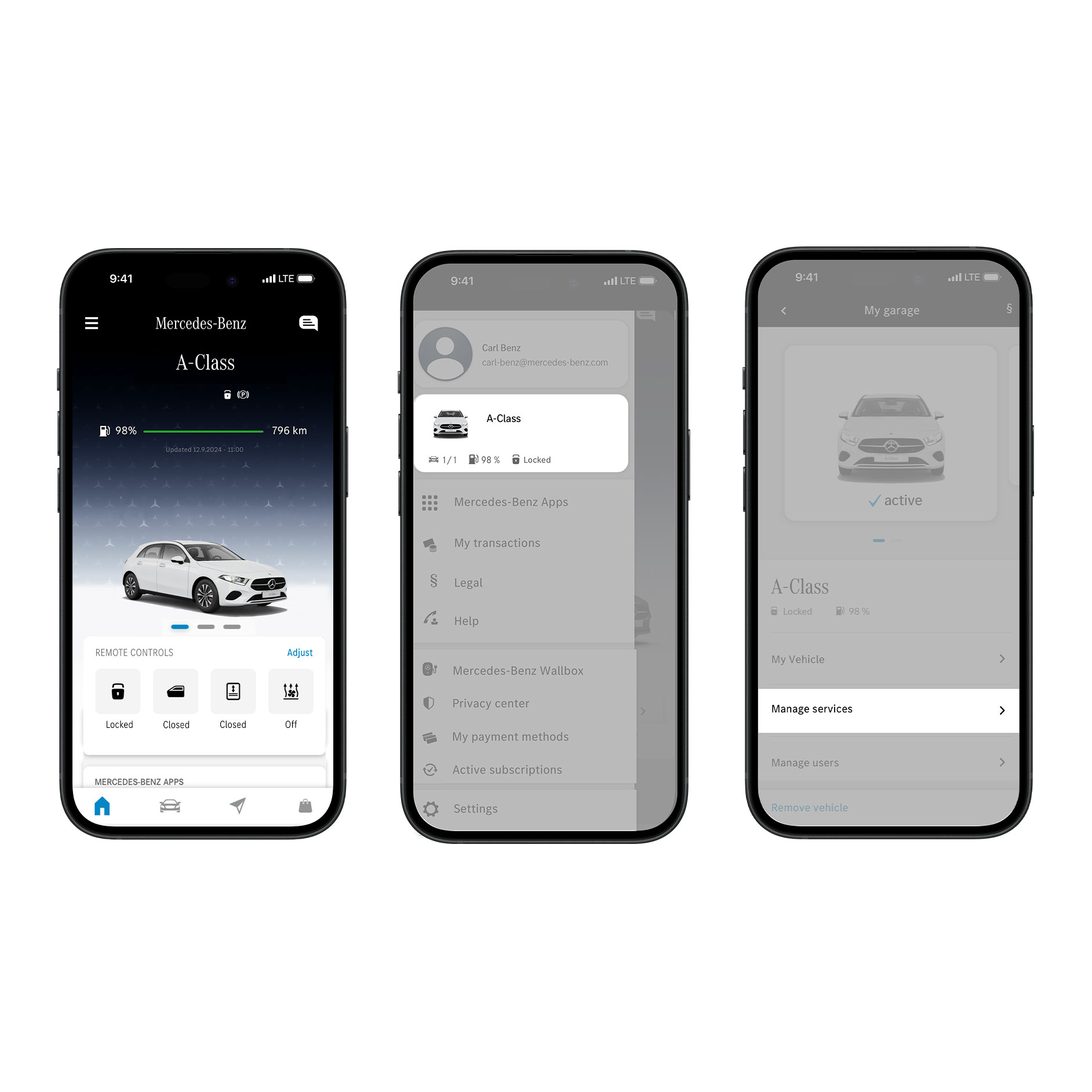;Resize=(600,450) "In-app activation Fuel & Pay | In-Car Payment Solutions | Mercedes-Benz")
• Log in with your Mercedes me ID on this website.
• You will then be taken directly to the "Manage Digital Extras" section.
• Scroll until the "Comfort" category appears. Now activate "Geofencing" and "Fuel & Pay".
Yes! The Service Fuel & Pay is free of charge.
When you fill-up with Fuel & Pay, you only pay for the amount of fuel purchased, and are billed via the stored payment method. At the end of the refueling process, you will be shown a payment summary. You can also use the Fuel & Pay service to compare fuel prices and find the right fueling station, without having to pay via app.
To be able to use Fuel & Pay via the infotainment system of your vehicle, the "Geofencing" option must be activated. This option is part of the Remote package. Additional costs may be incurred with this package. For more information click here. Via the Mercedes-Benz App this step isn't required and there are no additional costs.
You can currently use the Mercedes-Benz App on Apple and Android devices, which can easily be downloaded from the from Apple App Store or Google Play Store. After activating the service in the service management of your Mercedes-Benz App. Fuel & Pay can also be used via your vehicle's infotainment system. To check out if you can use Fuel & Pay via your vehicle read question 2 "Which Mercedes-Benz vehicles can I use Fuel & Pay with?"
With Fuel & Pay, you can pay for fill-ups directly from your vehicle at around XXXX participating fuel stations in Germany. You can recognize these fuel stations in the app's navigation map via the displayed black payment icon.
By filtering via the "Fuel & Pay" button, you will only be shown participating fuel stations
Participating Fuel & Pay stations have upgraded their POS systems to enable contactless payments from the car. Not all fueling stations have such a POS system, and may still need to be technically enabled. Therefore, we are continually adding new fuel stations to our network.
Yes, as this is the only way Fuel & Pay can show nearby fuel stations and current fuel prices or be used to pay for your fill-up.
Here's how it works with Fuel & Pay:
To enable paying with Fuel & Pay, the app digitally communicates via the internet with the POS system of the participating fuel station. The Mercedes-Benz App communicates with the cash register on your behalf, tells the number of the fuel pump, and pays.
Your active location is required to pay with Fuel & Pay directly via your vehicle. This is the only way the fuel station can recognize that you are physically present.
Does the Mercedes-Benz App display any of the following?
• Too far from the fuel pump. If too far away from the pump with your car, it will not be possible to pay with Fuel & Pay. It is recommneded to drive closer to the pump and try again.
• Location/GPS disabled. In order for the system to recognize that you are at a participating Fuel & Pay station, please activate the location detection and try again.
• No internet connection. Without a connection to a mobile network or Wi-Fi, Fuel & Pay cannot communicate with the fueling station cash register. So, check your internet connection and try again.
• Logged in? Check to see if you are logged into the Mercedes-Benz App.
• Has the service expired? If your vehicle is older than three years, you may be required to renew the "Geofencing" service for use via the infotainment system. "Geofencing" is part of the Remote Package and is available in the Mercedes-Benz Store. If you use the Fuel & Pay service via the Mercedes-Benz App, then this step is not necessary.
Contactless payment with Fuel & Pay is simple, fast and secure. When you arrive at the fuel station, simply go to any pump. Start Fuel & Pay via your Mercedes-Benz App or the infotainment system in your vehicle. Select the fuel pump at your location, and the maximum amount you want to fill up. Of course, you can also fill up for less than the maximum amount you have selected. You will only be charged for the amount you refueled.
With Fuel & Pay, you can pay for your tank filling quick, easy and safe from your vehicle via app or infotainment system. You can fill up and pay for all fuels available that your car requires at the selected fuel station. This includes Super Plus, LPG, CNG, premium fuels, AdBlue, etc
Currently, you can only pay with Fuel & Pay if the fuel station is open, as the fuel station employee needs to confirm at the cash register that you have paid from your vehicle
Yes! You can pay for any type of fuel that is available at participating fueling stations and that your vehicle requires. Fuel & Pay automatically recognizes your fueling transaction and the prices of the selected grade and transmits everything digitally to the cashier for payment processing via your stored credit card.
Due to a new EU regulation called the European Payments Services Directive (PSD2 for short), an additional security step is required for online and mobile payments.
Two-factor authentication takes place with your bank or card provider with 3D Secure (3DS for short), which ensures that you are really the person confirming payment at the fuel station with Fuel & Pay.
Your bank or card provider decides whether this is visible to you for each transaction or runs seamlessly in the background. To do this, simply follow the instructions in the app. You may need to confirm your identity before paying with Fuel & Pay. This is possible, for example, via Visa Secure or the Mastercard® Identity Check, and depends on your bank or card provider.
If the payment is cancelled and your identity is not confirmed, you cannot pay successfully with Fuel & Pay. In this case you must pay at the cash register.
The Fuel & Pay service gives you feedback via the infotainment system or app when the payment process is complete, and you can drive off. If you are unsure that your payment was successful, please ask the cashier before you leave the fuel station.
Yes, the fuel station employees receive a message via their POS system that you have paid from the car. Fuel & Pay digitally transmits this information directly, so you can continue on your journey with peace of mind.
Fuel & Pay is constantly working to ensure that paying for fuel is a smooth and convenient process. In the rare case that something doesn't work correctly, we provide help in the Mercedes-Benz App, by simply switching to the menu and selecting "Help". In the next step, you can write a message to our support team under "Contact Support" or call directly.
With Fuel & Pay, you can pay securely and easily with your stored credit card or with *SEPA direct debit.
(*only available within the Mercedes-Benz App)
If you want to delete or change your payment details, log in to the web with your Mercedes me ID. Switch to the "My profile" area via "My Mercedes me account" in the top right-hand corner. Under the item "Payment method" you can edit your payment information, add another credit card or delete it.
Other payment methods will be planned for the future. With Fuel & Pay, everything related to fueling and payment should be above all one thing for you: simple and convenient.
With your fuel receipt, you get everything that would be on the receipt you would receive at the cash register, including:
• The receipt number
• When, where and at which pump you refueled
• The quantity (e.g. litres), type of fuel and price
• The total amount including Value Added Tax (VAT)
• Details on which credit card was billed debited
• Information about the seller of the fuel.
You will receive a receipt immediately after fueling and paying with the stored email address used for Fuel & Pay. It is recommended to look in your email spam folder in the event an invoice has not been received. In the event that an invoice cannot be found, or you have not received an invoice, please contact our support.
Pay your fuel now easy and state-of-the-art via fingerprint (fingerprint sensor optional available for certain models with special equipment code 321). This payment method no longer requires a PIN or authorization via smartphone. With the native in-car payment service Mercedes pay+ the car itself turns into a payment method. In connection with the integrated fingerprint sensor a biometric two-factor authentication is achieved.
The service is integrated in the vehicle infotainment system and utilizes the online payment technology of Mastercard and Visa. This allows you to connect payment data securely with the vehicle. Just add the payment information to the Mercedes me user account, activate the native in-car payment service Mercedes pay+ via the infotainment system and confirm the car connection via the banking app on the smartphone. Now you can authorize payments with biometric two-factor authentication via fingerprint sensor from the vehicle. Nevertheless, alternatively it is still an option to enter a PIN via the infotainment display.
Currently, there can be added Debit- or Credit Cards from Mastercard and Visa. Mercedes pay+ can only be used with cards from Mastercard and Visa which were issued and authorized in Germany.
XXX
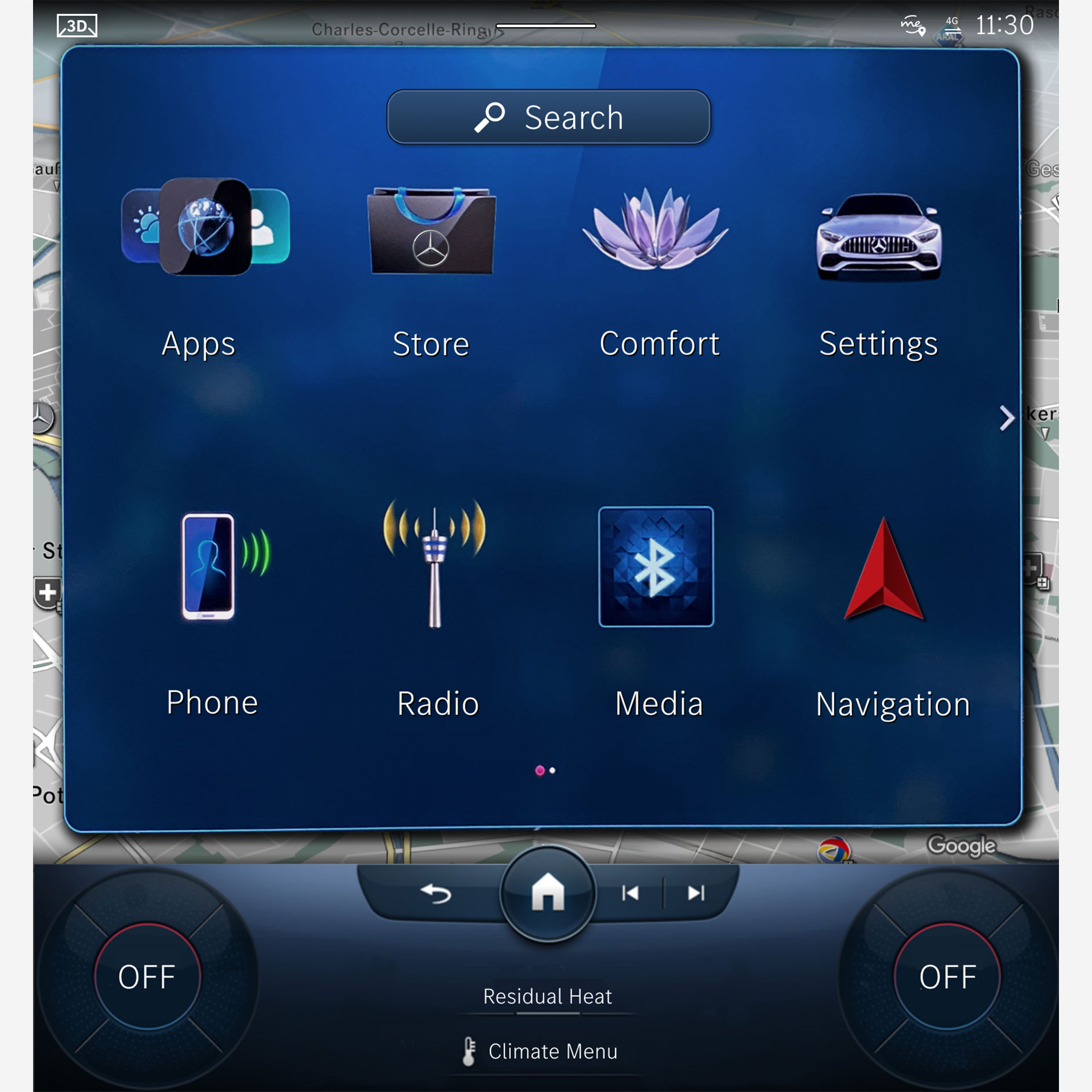;Resize=(600,450) "Adding credit card | In-Car Payment Solutions | Mercedes-Benz")
Digital payment with the native in-car payment service Mercedes pay+ via fingerprint sensor is currently available in Mercedes-Benz S-Class, C-Class, GLC, Mercedes-AMG SL and in the future in additional models (fingerprint sensor optional available with special equipment code 321).
A software update is not required to use the native in-car payment service Mercedes pay+. However, in order to be up to date, we would recommend installing the latest updates as provided.
You can save your IBAN for the SEPA direct debit mandate directly in the Mercedes-Benz App. To do so, open the map and tap on the Fuel & Pay fueling station icon. Upon selecting a fueling station, you'll see the option 'Add Payment Method.' Choose 'SEPA Direct Debit Mandate' and enter all the required details.
Currently, not all fueling stations offer SEPA direct debit. However, we are continuously working to introduce this payment method at more fueling stations.
Payment via fingerprint: discover even more convenience.
Register your credit card as a payment method in the vehicle right now, so that you can also pay quickly and easily by fingerprint.
When paying for fuel simply put your finger on the Fingerprint Scanner of your infotainment system MBUX to complete the payment process within seconds. This biometric two-factor authentication is a Mercedes pay+ service.
00:00 / 00:00
Send us your request by e-mail (me-connect.deu@cac.mercedes-benz.com) or use the help function of the
Mercedes-Benz App. To do this, go to the menu in the Mercedes-Benz App and select the "Help" item. In the next step, you can write a message to our support team under "Contact Support" or call them directly.
To use the Digital Extras, you must create a Mercedes me ID and agree to the Terms of Use for the Digital Extras. The services shown and their availability and functionalities depend, in particular, on the term, vehicle model, year of manufacture, selected optional equipment and country.
With native in-car payment service Mercedes pay + Mastercard and Visa customers can use Mercedes-Benz Fuel & Pay to pay by fingerprint.
FAQs about Car Wash
Do you have further questions about Car Wash?
In our FAQs you will find answers to frequently asked questions about the functionality, use, compability, setup and security of the Mercedes-Benz Car Wash service and more.
Payment with Car Wash
Car Wash at a glance.
Car Wash
Discover the Digital Extra Car Wash.
Experience the convenience of purchasing your car wash tickets through your Mercedes-Benz App – without having to visit the cash register.
Further information on compatible car models can be found in the FAQs below.
FAQs about Fuel & Pay
Do you have further questions about Fuel & Pay?
In our FAQs you will find answers to frequently asked questions about the functionality, use, compability, setup and security of the Mercedes-Benz Fuel & Pay service and more.
Payment with Fuel & Pay
Fuel & Pay digitally in just a few steps.
Fuel & Pay
Discover the Digital Extra Fuel & Pay.
Use Fuel & Pay to pay your fuel conveniently and digitally without going inside the shop. This innovative service can easily be used via the Mercedes-Benz App, and directly from your vehicle via the infotainment system MBUX. Digital checkout and not waiting times – easy and convenient. Accepted at over 7.000 fueling stations in Europe.
Highlights
Discover Digital Extras with integrated payment service.
Learn more about innovative payment processing for Digital Extras via app or in-car payment.